

Microsoft has taken the rare step of issuing emergency "out-of-band" (OOB) updates to address a critical compatibility flaw that has plagued Dell hardware following the rollout of the July 2026 security patches. This issue, which manifested as severe performance degradation, spontaneous system shutdowns, and thermal management failures, specifically targets users of the latest Windows 11 iterations. The rapid release of these updates underscores the severity of the disruption, which has affected a significant portion of Dell’s professional and consumer laptop lineups.
The problem first gained widespread attention earlier this month when users began reporting that their systems were becoming unresponsive or shutting down without warning after installing the mandatory July security cumulative updates. While Microsoft initially placed a safeguard hold on the updates for suspected devices, the release of KB5121767 and KB5121768 marks the official resolution for systems running Windows 11 versions 24H2 and 25H2, as well as the Enterprise LTSC 2024 edition.
Technical Root Cause: The Driver Conflict
The origin of the instability has been traced back to a specific architectural change introduced in the June 23, 2026, Windows preview cumulative update (KB5095093). This update debuted a redesigned Windows USB-C Connection Manager interface, intended to provide more robust handling of high-speed peripherals and power delivery over Type-C ports. However, this new interface inadvertently triggered a logic conflict with the Intel Innovation Platform Framework (IPF) Processor Participant driver.
The Intel IPF is a core system-level driver suite responsible for managing a computer’s power consumption, thermal limits, and cooling policies. In modern Dell systems, the Processor Participant driver acts as the intermediary between the operating system and the hardware’s thermal sensors. When the new Windows USB-C Connection Manager attempts to negotiate power states, it creates a "race condition" or communication error with the Intel IPF driver.
As a result, the operating system loses its ability to accurately monitor or regulate the CPU’s temperature and power draw. This leads to a cascade of failures: the system may believe it is overheating and trigger an emergency shutdown to protect the hardware, or it may throttle the processor to its lowest possible clock speed, resulting in the "poor performance" reported by users. In other cases, the mismanagement of power states leads to rapid battery drain even when the device is idle.
Identifying Affected Systems
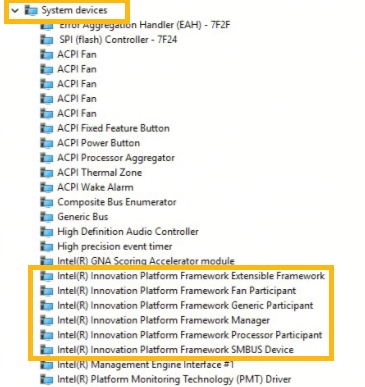
Microsoft has provided specific guidance for users to determine if their Dell device is currently suffering from this incompatibility. The most prominent indicator is found within the Windows Device Manager. On affected machines, a yellow exclamation mark icon appears next to the "Intel Innovation Platform Framework Processor Participant" entry under the "System devices" or specialized driver categories.
This visual warning signifies that the driver has failed to load correctly or has been stopped by the operating system due to reported errors. Beyond the Device Manager warning, users have reported the following symptoms:
- Thermal Spikes: Fans running at maximum speed despite low CPU usage.
- System Latency: Significant "lag" when performing basic tasks like opening folders or typing.
- Unexpected Reboots: The screen suddenly goes black, and the system restarts without a Blue Screen of Error (BSOD) or warning message.
- Battery Depletion: A drop of 20-30% in battery life within an hour of light use.
A Chronology of the Crisis
The timeline of the issue highlights the complexities of modern OS-to-OEM (Original Equipment Manufacturer) hardware integration.
- June 23, 2026: Microsoft releases KB5095093 as an optional "preview" update. This update contains the new USB-C Connection Manager code. A small number of Dell users who opt-in to preview updates begin experiencing minor glitches.
- July 14, 2026 (Patch Tuesday): The code from the June preview is rolled into the mandatory July security update (KB5101650). As millions of devices download the update, the scale of the Dell incompatibility becomes apparent.
- July 15–16, 2026: Dell’s support forums and social media channels are flooded with reports of "bricked" or unusable Latitude, XPS, and Precision laptops. Dell engineers begin working with Microsoft to isolate the driver conflict.
- July 21, 2026: Microsoft officially acknowledges the issue on its Windows Release Health dashboard. The company implements a "safeguard hold," preventing the July security update from being offered to Dell systems that match the problematic hardware ID profile.
- July 25, 2026: Microsoft releases the emergency OOB updates (KB5121767 and KB5121768). These patches are specifically designed to bridge the compatibility gap between the Windows USB-C Manager and the Intel IPF driver, effectively lifting the safeguard hold.
Deployment and Installation Guidance
The emergency updates are being distributed through several channels depending on how the device is managed. For standard home users and small businesses, the update should appear automatically in the Windows Update settings menu. Microsoft notes that while the update is "Out-of-Band," it is being delivered with high priority.

For enterprise environments, the deployment path is more structured:
- Windows Autopatch: Devices enrolled in Autopatch with hotpatching enabled will receive the fix automatically without requiring a full system reboot in some configurations, though Microsoft recommends a restart to ensure the Intel IPF driver reinitializes correctly.
- Microsoft Intune: IT administrators can use the "Expedite Windows Quality Updates" policy to push KB5121767 to their fleet. This overrides standard deferral policies to ensure mobile workers are not left with unstable hardware.
- Microsoft Update Catalog: For "air-gapped" systems or those managed via WSUS (Windows Server Update Services), the standalone packages are available for manual download.
Microsoft emphasized in its technical bulletin that these updates are "only recommended for devices affected by this issue." Systems from other manufacturers, such as HP, Lenovo, or ASUS, do not appear to be affected by this specific driver conflict, as their implementation of the Intel Innovation Platform Framework utilizes different hardware IDs or firmware configurations.
Industry Reactions and Analysis
The incident has sparked a renewed debate regarding the "Preview Update" model utilized by Microsoft. While the June preview was intended to catch these bugs before the mandatory July rollout, the specific combination of Dell firmware and Intel drivers appears to have bypassed initial automated testing.
Industry analysts suggest that the conflict highlights a growing challenge in the Windows ecosystem: the move toward "Universal" drivers. As Microsoft attempts to standardize how Windows handles hardware like USB-C and power management, the unique customizations made by OEMs like Dell to optimize their specific chassis and cooling solutions can lead to unforeseen friction.
Dell has issued a brief statement advising customers to apply the Microsoft fix immediately. "We are working closely with Microsoft to ensure that all affected Dell systems regain full functionality. Customer experience and system stability remain our top priorities," a Dell spokesperson stated. Intel has also reportedly updated its driver documentation to account for the new Windows USB-C Connection Manager logic to prevent similar issues in future driver releases.
Broader Implications for Windows 11
The release of emergency updates for Windows 11 25H2—a version that represents the cutting edge of the Windows roadmap—indicates that even the most modern iterations of the OS are susceptible to legacy-style driver conflicts. This event may lead to a more cautious approach for future updates involving "Connection Managers" and other core kernel-level interfaces.
For Dell, the event is a reminder of the risks associated with being a market leader in the enterprise space. Because Dell systems are so prevalent in corporate environments, any update-related failure has an outsized impact on global productivity. This incident follows a series of high-profile "Patch Tuesday" regressions seen across the industry in recent years, pushing many IT departments to adopt more aggressive testing rings before deploying updates to their entire workforce.
As of late Saturday, Microsoft confirmed that the safeguard holds are being gradually lifted as telemetry data shows successful installations of the OOB patches. Users who were previously unable to see the July security update should now see both the security update and the emergency fix available for download. Microsoft continues to monitor the situation to ensure that the fix does not introduce secondary issues with peripheral connectivity or external docking stations, which are also managed by the contested USB-C interface.
